Markdown-Dateien bearbeiten
OpenCloud verwendet einen Tiptap-basierten Markdown-Editor für Dateien wie README.md und andere .md-Dateien. Der Editor hilft Ihnen dabei, Inhalte zu schreiben und zu formatieren, auch wenn Sie die Markdown-Syntax nicht gut kennen.
So funktioniert der Editor
Wenn Sie eine Markdown-Datei öffnen, zeigt OpenCloud sie im Editor an, sodass Sie die Datei direkt im Browser bearbeiten können.
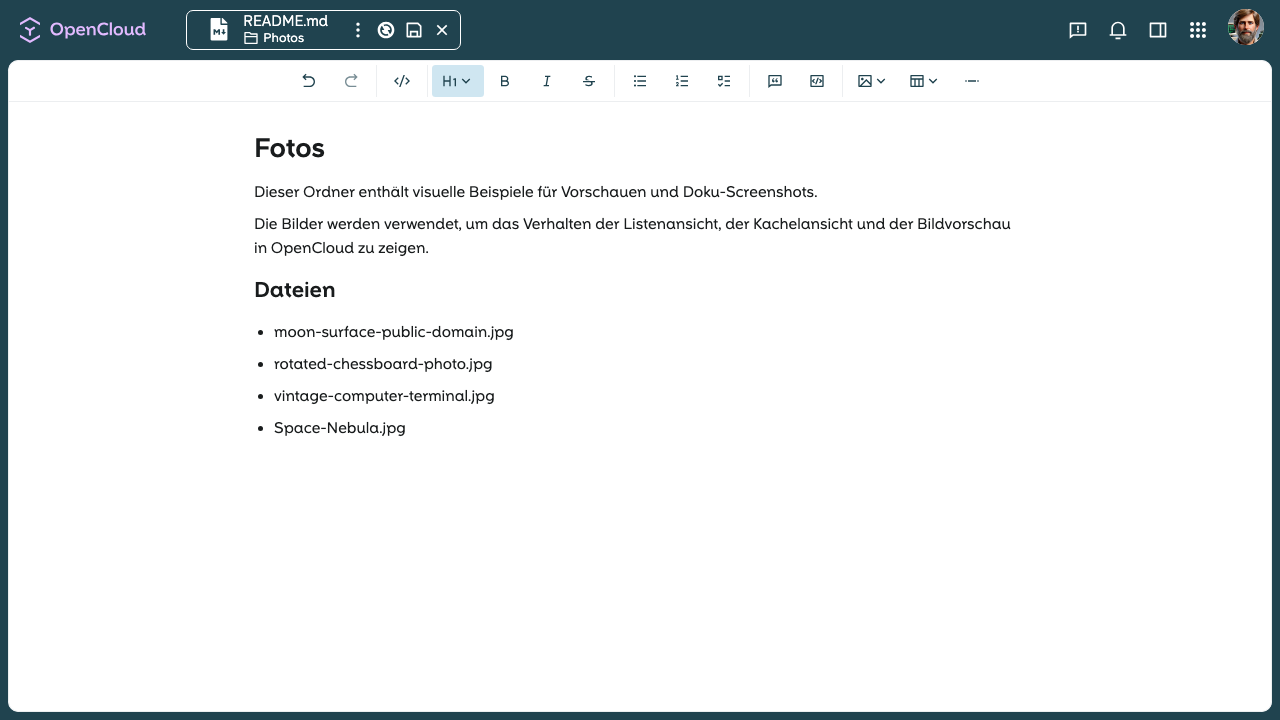
Sie können Überschriften, Listen, Links, Zitate, Code und andere häufige Formatierungen hinzufügen, ohne die Dateiansicht zu verlassen.
Während Sie bearbeiten, zeigt OpenCloud den Markdown-Inhalt direkt gerendert an, sodass Sie sofort sehen können, wie die Datei aussehen wird.
Der Editor unterstützt außerdem das Einfügen von Bildern und das Erstellen von Tabellen, sodass Sie reichhaltigere Markdown-Dateien direkt in OpenCloud einfacher erstellen können.
Slash-Kürzel verwenden
Geben Sie / in einer neuen Zeile ein, um das Formatierungsmenü zu öffnen.
Das Menü gibt Ihnen einen schnellen Überblick über die verfügbaren Formatierungsoptionen und erlaubt es Ihnen, diese zu nutzen, ohne sich jede Tastenkombination merken zu müssen.
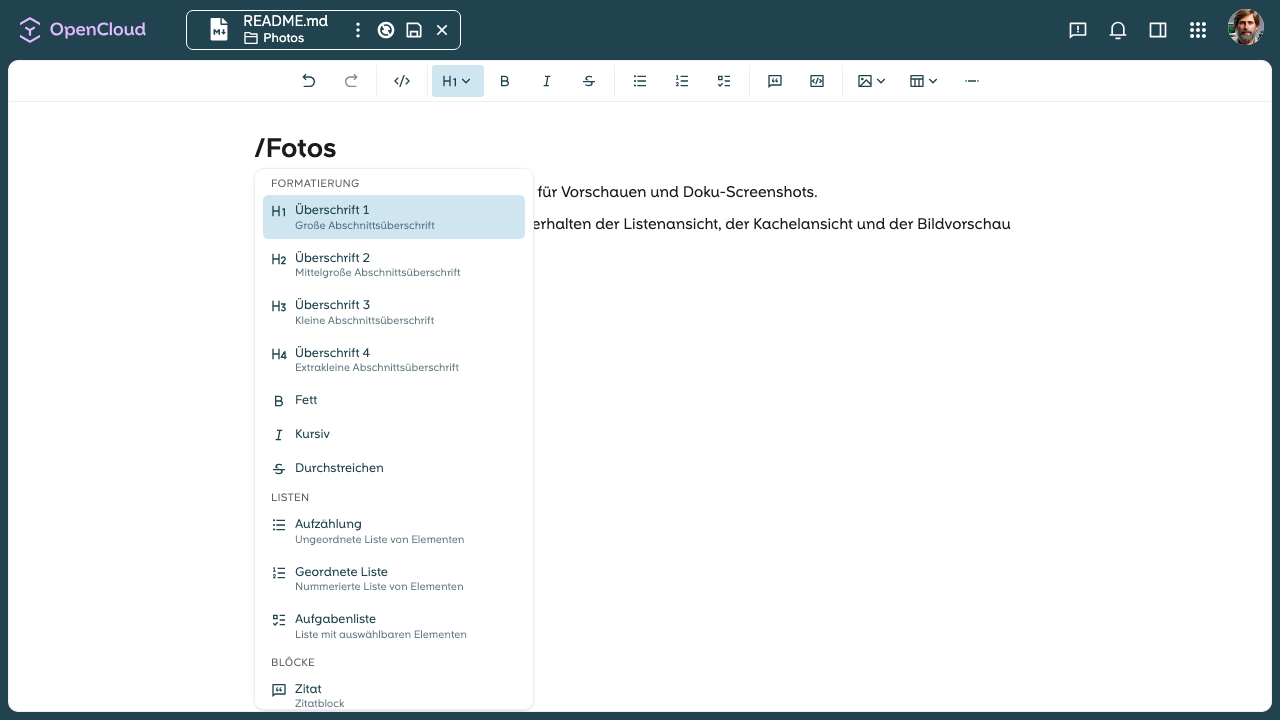
Das ist besonders hilfreich, wenn Sie schnell formatieren möchten und dabei die Hände auf der Tastatur lassen wollen.
Formatierungsleiste verwenden
Verwenden Sie die Formatierungsleiste oberhalb des Editors, um häufige Markdown-Elemente einzufügen.
Klicken Sie auf die Schaltfläche Heading, um eine Überschriftenebene auszuwählen, oder verwenden Sie die anderen Schaltflächen für Fett, Kursiv, Listen, Code, Bilder und Tabellen.
Das ist besonders hilfreich, wenn Sie Inhalte schnell formatieren möchten, ohne sich jede Markdown-Tastenkombination merken zu müssen.
Unterstützte Formatierung
Der Markdown-Editor unterstützt gängige Formatierungsoptionen für alle Markdown-Dateien. Sie können die Formatierungsleiste oder das Slash-Menü verwenden, um Folgendes einzufügen:
- Überschriften
- Fett und kursiven Text
- Aufzählungs- und nummerierte Listen
- Zitate
- Inline-Code und Codeblöcke
- Links
- Bilder
- Tabellen
Gut zu wissen
- Der Editor funktioniert für Markdown-Dateien wie
README.md. - Sie können das Formatierungsmenü verwenden, um strukturierte Inhalte Schritt für Schritt zu erstellen.
- Die Datei bleibt eine normale Markdown-Datei und kann daher auch außerhalb von OpenCloud verwendet werden.
Wenn die Datei gespeichert wird, wird der Markdown-Inhalt in derselben .md-Datei gespeichert und kann überall dort gerendert werden, wo Markdown unterstützt wird.