Here a is an overview of the fileslist menu in the OpenCloud Android-App
This section explains the core interface elements of the OpenCloud Android app and their functionality.
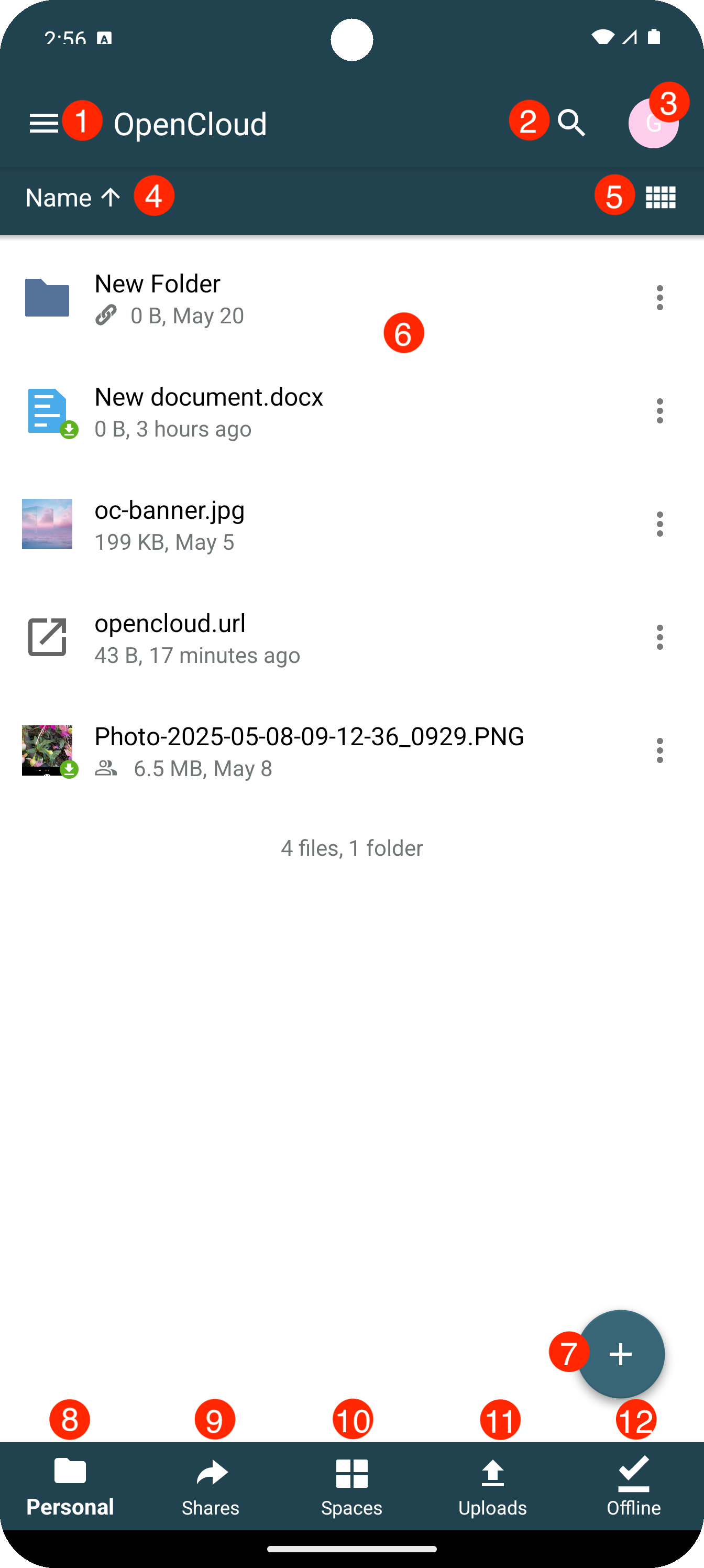
1. Account Menu
Provides access to account settings.
2. Search
Lets the user search for files, folders, or shared items within the app.
3. Manage Accounts
Lets the user see the active account and add another account.
4. Sort by
Lets the user sort files by name, date, size, or other criteria.
5. View Mode
Allows switching between different view modes.
6. Files List
Shows the contents of the current folder as a list of files and folders.
7. Add Button
Opens options to upload files, create folders, or add new content.
8. Personal
Allows quick switch to personal space.
9. Shares
Allows quick switch to shares list.
10. Spaces
Allows quick switch to spaces list.
11. Uploads
Allows quick switch to uploads list.
12. Offline
Allows quick switch to a list where files and folders are available offline.