Migrate
Migrate Personal Space Data to OpenCloud Using rclone
This guide will help you migrate personal space data from NextCloud and oCIS to OpenCloud using rclone. Follow these steps carefully to ensure a smooth migration!
Generate users token using CLI or API
- OpenCloud
- oCIS
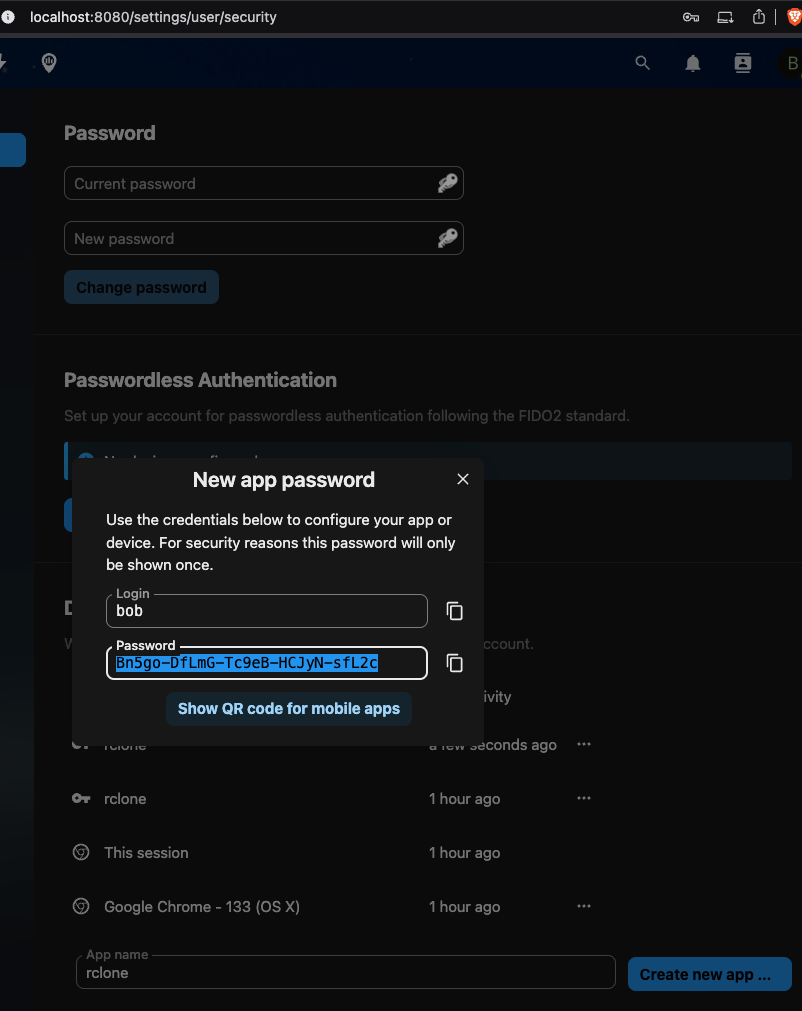
- Nextcloud
Run OpenCloud with the following configuration
Modify .env file:
START_ADDITIONAL_SERVICES="auth-app"
Enable auth-app service:
PROXY_ENABLE_APP_AUTH="true"
Generate user token using CLI
Access the OpenCloud container:
docker exec -it opencloud-compose-opencloud-1 sh
Generate an authentication token for a user (e.g., alan) with expiration (h, m, s):
opencloud auth-app create --user-name=alan --expiration=72h
Generate user token using API
Requires additional configuration! Start the server with:
AUTH_APP_ENABLE_IMPERSONATION=true
Then generate a token via API:
curl -vk -XPOST 'https://opencloud_url/auth-app/tokens?expiry=72h&userName=alan' -uadmin:admin
Run oCIS with the following configuration
Modify .env file:
START_ADDITIONAL_SERVICES="auth-app"
Enable auth-app service:
PROXY_ENABLE_APP_AUTH="true"
Generate user token using CLI
Access the oCIS container:
docker exec -it ocis_full-ocis-1 sh
Generate an authentication token for a user (e.g., einstein) with expiration (h, m, s):
ocis auth-app create --user-name=einstein --expiration=72h
Generate user token using API
Requires additional configuration! Start the server with:
AUTH_APP_ENABLE_IMPERSONATION=true
Then generate a token via API:
curl -vk -XPOST 'https://ocis_url/auth-app/tokens?expiry=72h&userName=einstein' -uadmin:admin
Install rclone
Download and install rclone by following the official guide: rclone.org/install
Encrypt Authentication Tokens
rclone obscure <token>
Create the rclone Configuration
Edit the rclone configuration file and insert your token into the pass field:
nano ~/.config/rclone/rclone.conf
- Example Configuration
[opencloud-admin]
type = webdav
url = https://opencloud_url/remote.php/webdav
vendor = opencloud
owncloud_exclude_shares = true
user = admin
pass = sQOM4mn2DdR9ihRGkyAMcd50W6mniaSqSfx2qVOdBJs
description = opencloud-admin

[opencloud-alan]
type = webdav
url = https://opencloud_url/remote.php/webdav
vendor = opencloud
owncloud_exclude_shares = true
user = alan
pass = sQOM4mn2DdR9ihRGkyAMcd50W6mniaSqSfx2qVOdBJs
description = opencloud-alan

[ocis-admin]
type = webdav
url = https://ocis_url/remote.php/webdav
vendor = ocis
owncloud_exclude_shares = true
user = admin
pass = Sav5354nRTgBHyItQeCZp9tCBidX2BxbuMx_dDLwxqs
description = ocis-admin

[ocis-einstein]
type = webdav
url = https://ocis_url/remote.php/webdav
vendor = ocis-einstein
owncloud_exclude_shares = true
user = einstein
pass = dcYsf3PNvBxaIi7MMq-bqg74KMWWWS8p3uFT-WD17SA
description = ocis-einstein

[nc-admin]
type = webdav
url = http://nc_url/remote.php/webdav
vendor = nc
owncloud_exclude_shares = true
user = admin
pass = IBSkhC1wCDdS2Gt9iBV-C9IqlGek
description = nc-admin

[nc-bob]
type = webdav
url = http://localhost:8080/remote.php/webdav
vendor = nc-bob
owncloud_exclude_shares = true
user = bob
pass = ufOK3zPDjR4meEwwy3cWUVA18Lf8TpubBRyPL5m9KC508PkMiEVAXTxg6olu
description = nc-bob
Prepare OpenCloud for a Large Migration
The steps in this section are intended for a large initial bulk import. Skip them for small migrations where the additional system load is not a concern.
A bulk import generates substantially more file events than normal operation. Temporarily exclude
the activitylog and search services to prevent activity processing and search indexing from
competing with the migration for system resources.
Add both services to OC_EXCLUDE_RUN_SERVICES in the OpenCloud .env file:
OC_EXCLUDE_RUN_SERVICES=activitylog,search
If the variable already contains other services, preserve them and append activitylog and search
to the comma-separated list. Restart the OpenCloud container after changing the configuration.
While the services are excluded:
- OpenCloud does not record activity history for files created or updated by the migration. This can prevent duplicate or misleading entries when data is migrated in multiple passes.
- Search results for migrated data remain incomplete until the search service is re-enabled and the index is rebuilt.
Copy Data to OpenCloud
Use rclone copy to transfer data from oCIS and Nextcloud to OpenCloud:
rclone copy ocis-admin:/ opencloud-admin:/ --no-check-certificate -P  # Copy oCIS admin personal space to OpenCloud admin space
rclone copy ocis-einstein:/ opencloud-alan:/ --no-check-certificate -P  # Copy oCIS bob's personal space to OpenCloud admin space
rclone copy nc-bob:/ opencloud-alan:/ --no-check-certificate -P  # Copy Nextcloud admin personal space to OpenCloud admin space
Restore Normal Operation After a Large Migration
If you applied the optimizations for a large migration:
-
Remove
activitylogandsearchfromOC_EXCLUDE_RUN_SERVICES, preserving any services that were excluded before the migration. -
Restart OpenCloud and wait until the search service is ready.
-
Build the search index for all Spaces:
docker compose exec opencloud opencloud search index --all-spacesIndexing can take a long time on large installations. Search results remain incomplete until it has finished.
Migration Results and Limitations
Congratulations! You have successfully migrated personal space data to OpenCloud!
-
Successfully Migrated
- Personal space files
-
Not Migrated
- Shared files
- Public links
- Project spaces
- Trash-bin contents
- File versions
- Metadata
Security Step: Delete Tokens
Once the migration is complete, please delete tokens to prevent unauthorized access!