Disable frontend update check
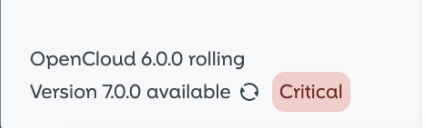
By default, OpenCloud performs a frontend check to verify if you are running the latest version.
note
When the frontend update check detects a security-critical upgrade, administrators may see a warning in the lower-left corner of the web interface. This warning indicates that the available upgrade should be reviewed and applied with priority.

Edit the .env File
Open the environment configuration file located in your opencloud-compose directory:
nano opencloud-compose/.env
Set the FRONTEND_CHECK_FOR_UPDATES environment variable to false to disable the frontend check for updates:
FRONTEND_CHECK_FOR_UPDATES=false
Restart Docker Services
After saving the file, shut down and restart the Docker containers to apply the changes:
docker compose down
docker compose up -d
Result
The frontend will no longer display a message about newer versions being available.