Interface Overview
This section explains the core interface elements of the OpenCloud iOS app and their functionality.
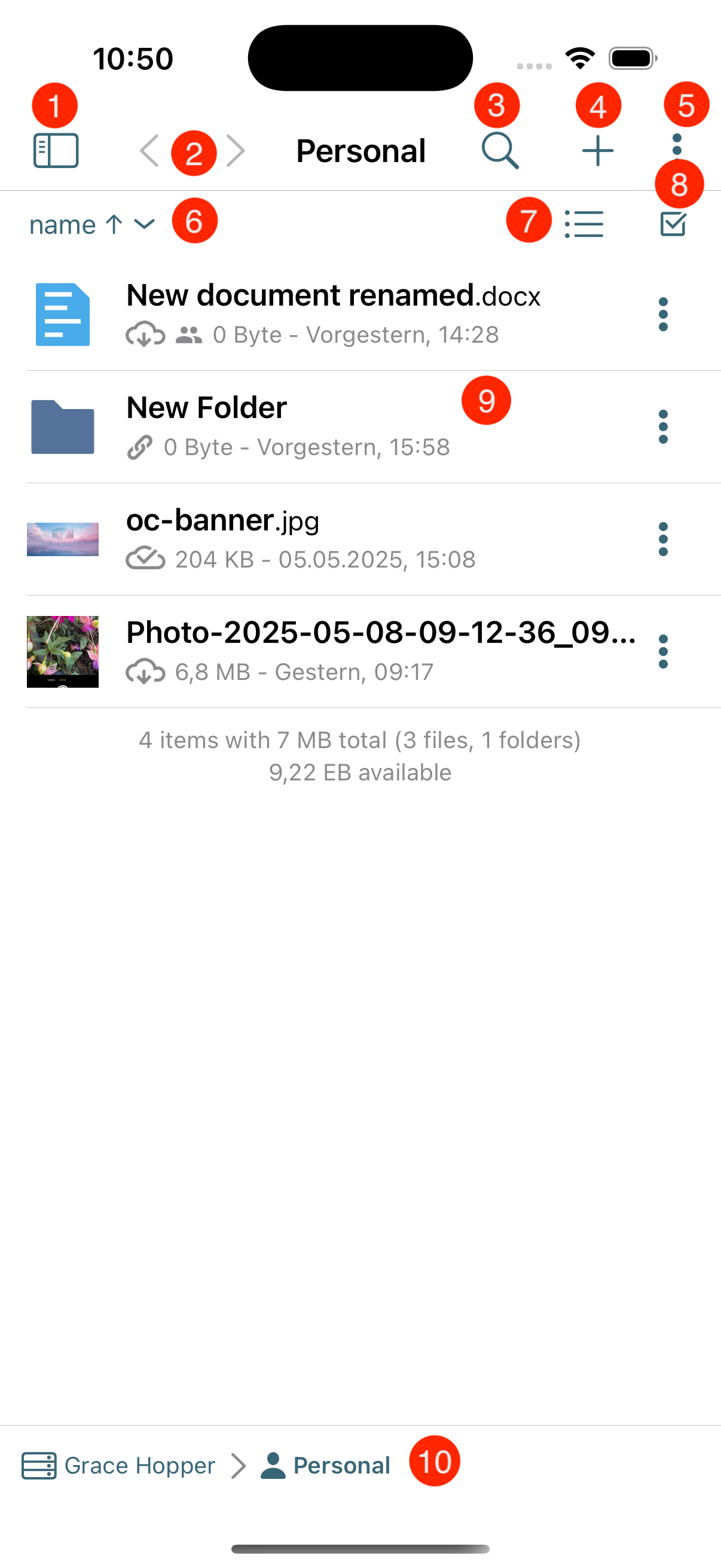
1. Account Menu
Provides access to account settings.
2. Navigation History
Allows you to go back and forward through previously visited views or folders.
3. Search
Lets the user search for files, folders, or shared items within the app.
4. Add Button
Opens options to upload files, create folders, or add new content.
5. Three Dot Menu
Displays additional actions or settings related to the current view or item.
6. Sorting
Lets the user sort files by name, date, size, or other criteria.
7. View Mode
Allows switching between different view modes.
8. Selection Toggle
Enables multi-select mode to select multiple files or folders at once.
9. Files List
Shows the contents of the current folder as a list of files and folders.
10. Breadcrumbs Menu
Displays the current folder path and allows quick navigation to parent folders.