Account Menu
In the iOS app, the account menu provides access to various personal and sharing-related features.
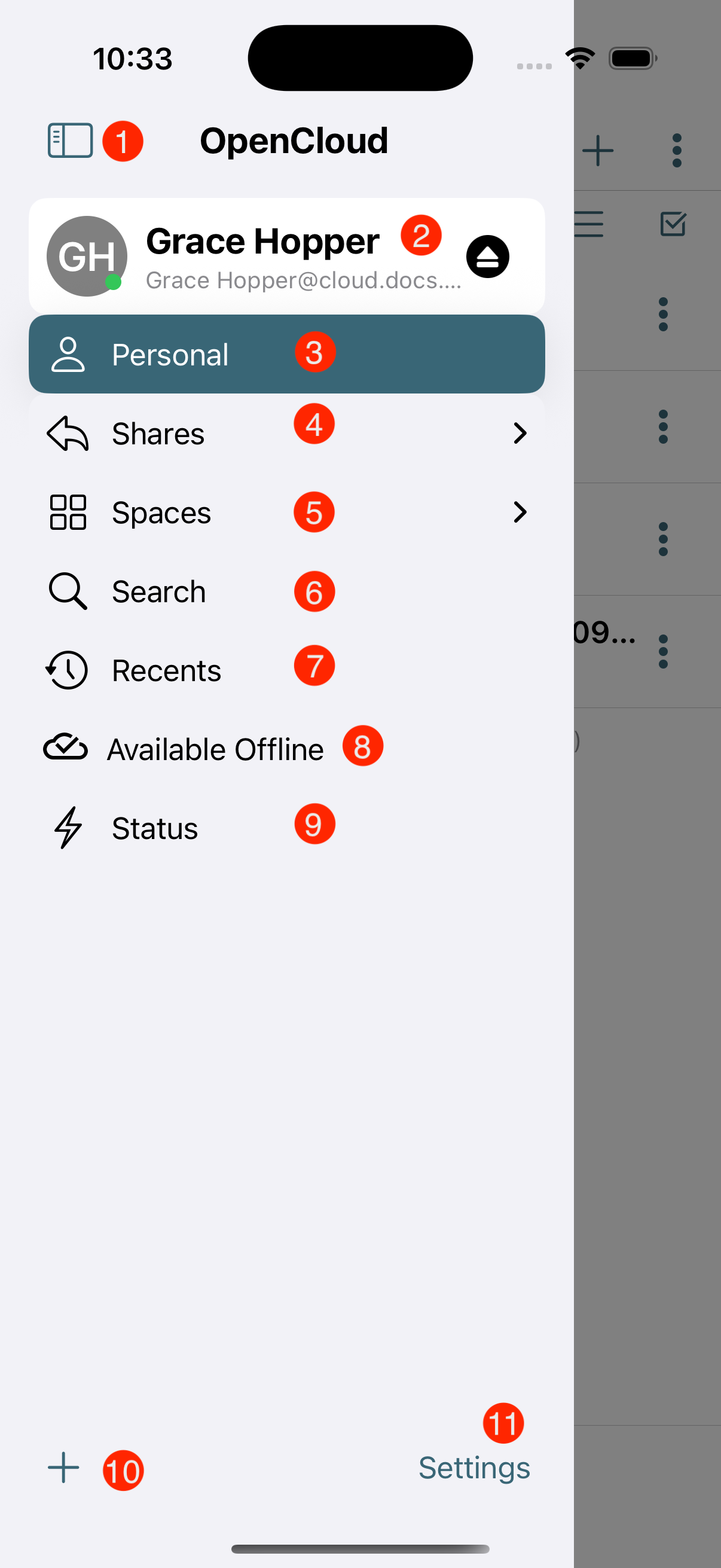
1. Account Menu Item
Opens the main account options and settings.
2. Active Account
Shows which user account is currently active.
3. Personal Space Menu Item
Gives access to the user's personal files and folders.
4. Shares Menu Item
Displays files and folders that have been shared with others or received.
5. Spaces Menu Item
Opens a list of collaborative spaces or team folders.
6. Search Menu Item
Allows the user to search through files, folders, and content.
7. Recents Menu Item
Shows a list of recently accessed or modified files.
8. Available Offline Menu Item
Displays files that are marked for offline access.
9. Status Menu Item
Indicates the current sync or connection status.
10. Add Account Menu Item
Lets the user add a new account to the application.
11. Settings Menu Item
Opens the general settings and configuration options.